Wednesday, October 14, 2015

30 Daftar Aplikasi Android Penting Setelah di Root

30 Daftar Aplikasi Android Penting Setelah di Root

Bedakan Smartphone -- Pernahkah anda berpikir, apakah langkah yang harus dilakukan setelah android di root? Jawabannya adalah dengan menginstall aplikasi penting berikut ini karena memiliki banyak kegunaan dalam mempermudah kita dan memberikan akses yang penuh untuk ponsel android yang kita miliki sehingga membuat kita tidak bosan dengan fitur-fitur yang dimiliki smartphone android karena bisa di customisasi sedemikian rupa sesuai keinginan penggunanya sendiri. Silahkan simak daftar aplikasi android berikut ini, dan jika anda ingin mendownloadnya silahkan kunjungi saja Google Play Store. Baca juga postingan sebelumnya tentang cara membedakan hp iphone asli dan palsu


1. Droidwall => kegunaan dari aplikasi droidwall ini adalah untuk menghemat internet. Selama ini kendala yang dimiliki oleh semua android yaitu boros kuota internet, nahh dengan dengan hanya satu aplikasi ini, internet tidak akan lagi boros karena pengguna/ user sendirilah yang mengatur aplikasi mana saja yang boleh untuk mengakses internet. Sehingga aplikasi lain yang berjalan dibelakang baground tidak akan bisa mengakses internet dan membuat kuota data internet hemat hingga 80%. Untuk mengetahui update tutorial aplikasi anda bisa bergabung di garup facebook disini

2. Titanium Backup => adalah aplikasi yang memiliki kegunaan untuk menambah RAM anda menjadi lebih banyak sehingga ponsel android tidak lagi menjadi lemot. Meskipun kebanyakan orang menggunakan aplikasi ini untuk menyalin (back up), mengembalikan (restore) maupun konfigurasi pada Android. Dengan menggunakan fitur Freeze pada aplikasi ini, anda bisa membekukan aplikasi yang berjalan dibelakang background dan memakan RAM yang banyak. Dengan membekukan aplikasi yang tidak berguna tersebut, secara otomatis RAM anda akan bertambah hingga 5 kali lipat.

3. Link2sd => adalah aplikasi yang digunakan untuk memindahkan aplikasi yang ada di memori internal ke memori eksternal. Karena, selama ini kendala yang dialami smartphone android yaitu setiap menginstall aplikasi secara otomatis semua datanya akan berada di memori internal yang membuat internal memori menjadi penuh sehingga ponsel android anda menjadi lemot. Dengan aplikasi ini semua masalah itu bisa teratasi karena Link2sd bisa memindahkan data aplikasi di memori internal ke memori eksternal tanpa membuat aplikasi tersebut menjadi rusak.

4. Auto Killer Memory => adalah aplikasi untuk mematikan aplikasi yang berjalan secara otomatis apabila RAM sudah berada diambang batas. Fungsi lain dari aplikasi ini yaitu untuk mempercepat loading ponsel dan menghemat baterai.

5. SuperSU => adalah aplikasi yang menunjukkan apakah perangkat anda telah di-root (memiliki akses ke sistem sebagai superuser) atau tidak. Aplikasi ini memiliki izin tertinggi untuk dapat memodifikasi hampir semua bagian dari sistem andoid anda.

6. AdAway => adalah aplikasi untuk menghapus iklan yang muncul pada aplikasi lain di ponsel android anda. Setelah berhasil root, anda sebaiknya memiliki aplikasi ini agar bisa memblokir iklan. Dengan memblokir iklan kuota data internet anda akan menjadi lebih hemat hingga 50% lebih.

7. Better Battery Stats => adalah aplikasi yang memiliki kegunaan untuk mengetahui keadaan baterai smartphone android anda. Aplikasi ini juga bisa mengontrol keadaan baterai lebih rinci sehingga anda bisa mengetahui kapan harus melakukan charge. Tak hanya itu saja, masih banyak lagi fitur lainnya dari aplikasi ini yang bisa anda coba sendiri.

8. CPU Sleeper => adalah aplikasi menghemat baterai kamu karena memiliki fungsi mematikan prosesor ketika smartphone anda idle sehingga tidak memakan konsumsi baterai yang berlebihan. Aplikasi ini sangat wajib anda miliki karena fitur dan fungsinya yang sangat bermanfaat bagi anda pengguna smartphone android.

9. GameCIH => adalah aplikasi untuk cheat hampir semua game yang ada pada smartphone Android anda. Aplikasi ini berguna untuk men-cheat uang/ poin/ level atau membuka senjata dan lainnya pada game yang diinginkan. Sehingga aplikasi ini dapat membantu anda dengan mudah menyelesaikan level dari sebuah game.

10. CacheMate => adalah aplikasi yang digunakan untuk membersihkan cache cukup dengan

satu sentuhan. Dengan fitur Auto Clear, anda dapat mengatur jadwal pembersihan cache. Menginstall Power Clear anda dapat menghemat memori SD, karena semua sampah-sampah dapat dibersihkan dengan menggunakan aplikasi ini, sehingga memori ponsel android anda menjadi lega dan menjalankan aplikasi-pun tampak cepat dan responsive.

11. Market Unlocker => adalah aplikasi yang berguna untuk mengunduh aplikasi yang tidak ada di Play Store Indonesia tetapi ada di Play Store Amerika. Dengan aplikasi Market Unlocker anda bisa memakai aplikasi yang tersedia di regional Amerika, Asia,

dan negara lainnya.

12. Lucky Patcher => merupakan aplikasi Android yang berguna untuk meng-crack aplikasi yang memiliki Premium License Verification. Misalnya, jika anda pernah mendownload aplikasi tertentu di Play Store setelah di install ternyata aplikasi itu meminta anda untuk membeli baru bisa digunakan. Nahh, dengan aplikasi ini semua aplikasi premium tersebut menjadi gratis,,tis,,tis tanpa bayar lagi.

13. Beats audio Installer => adalah aplikasi untuk menikmati fitur Beats Audio yang memang sebenarnya fitur ini eksklusif ini ada pada perangkat HTC. Namun sekarang anda tinggal mendownloadnya di Play Store lalu menikmati suara bass yang keren seperti pada smartphone HTC di android anda.

14. Full! Screen => adalah aplikasi untuk membuat layar smartphone android anda menjadi full screen dengan menyembunyikan notifikasi bar diatas dan tombol menu dibawah. Kelebihan aplikasi ini yaitu, meskipun disembunyikan fungsi dari tombol tersebut tetap berjalan. Amazing bukan?...

15. SCR Screen Recorder Free => adalah aplikasi yang digunakan untuk mem-video semua aktivitas yang ada pada smartphone android anda. Aplikasi ini sangat cocok bagi Gamer Android yang ingin menunjukkan bagaimana cara untuk melewati sebuah rintangan tertentu. Anda bisa merekam layar android untuk dijadikan sebagai video tutorial. Selain itu, anda bisa menggunakan sesuai dengan kebutuhan masing-masing.

16. Apk Installer => adalah aplikasi yang digunakan untuk mengambil master aplikasi yang telah di install di android. Misalnya, jika anda mengunduh aplikasi atau game di Play Store maka akan langsung terinstall dan anda tidak memiliki file masternya. Nahh,, dengan aplikasi ini semua aplikasi maupun game yang telah di insatll dapat diambil file masternya sehingga dapat dikirik ke teman anda melalui bluetooth.

17. AirDroid => merupakan aplikasi android untuk memindahkan file dari Android ke komputer atau sebaliknya tanpa menggunakan perangkat kabel. Selain itu, aplikasi ini juga dapat mengirimkan SMS melalui komputer, clipboard sharing, serta membackup dan sebagainya dari perangkat android. AirDroid sangat cocok bagi anda yang  suka berurusan dengan Android dan komputer secara bersamaan. Canggih bukan?...

18. Gravity Screen => adalah aplikasi yang berguna untuk menghidupkan dan mematikan layar secara otomatis tanpa perlu sentuhan lagi. Selain itu, aplikasi ini menyediakan berbagai macam fitur canggih lainnya yang dapat dinikmati secara gratis. Silahkan anda unduh dan mencoba kecanggihan dari aplikasi ini.

19. SD Speed Increase => merupakan aplikasi untuk meningkatkan kemampuan micro SD dengan cara yang cukup mudah, tinggal meningkatkan slider yang ada pada aplikasi maka kemampuan micro SD anda dapat membaca dua kali lipat lebih cepat dari biasanya.

20. Root Explorer => adalah aplikasi manajer file yang berguna untuk mengakses seluruh sistem file didalam ponsel Android. Aplikasi ini memiliki fitur seperti mampu membaca file ZIP, APK, XML serta masih banyak lagi fitur lainnya yang bisa anda coba sendiri.

21. Terminal Emulator => merupakan aplikasi Command Prompt yang ada pada android. Anda bisa menggunakan perintah-perintah berbasis linux dengan terminal command promt pada smartphone android anda.

22. Faster GPS => merupakan aplikasi yang menawarkan fitur GPS lock yang berfungsi untuk memercepat akselerasi GPS. Anda hanya mensetting region terdekat dimana anda berada, maka aplikasi ini akan segera mengunci posisi koordinat keberadaan anda.

23. ChainFire 3D => adalah sebuah aplikasi yang menghubungkan antara prosesor grafis dan aplikasi permainan yang terinstall pada samrtphone android anda. Dengan aplikasi ini, anda dapat bermain game yang tidak mungkin dimainkan di perangkat Android karena keterbatasan GPU. Kini bermain game menjadi lebih mudah bukan?...

24. Appextractor => merupakan aplikasi yang memungkinkan untuk mengembalikan aplikasi individual, data, SMS serta MMS dari ROM back-up manager apabila kamu suka melakukan flashing Custom ROM pada smartphone android milik anda.

25. Root Firewall Pro => adalah aplikasi yang mengatur penggunaan internet yang memungkinkan anda memilih jaringan yang diinginkan seperti 2g, 3g, 4g maupun Wi-Fi untuk masing-masing aplikasi sesuai kehendak anda sendiri. Fitur lainnya dari aplikasi ini yakni dapat melakukan pemblokiran iklan (ads) pada smartphone android.

26. DiskDigger Pro => merupakan aplikasi yang berguna untuk memulihkan file atau foto yang terhapus secara tidak sengaja. Tak hanya itu saja, data yang hilang akibat terformat juga bisa dikembalikan dengan menggunakan aplikasi ini. Meskipun terdapat banyak aplikasi serupa lainnya, tetapi menurut beberapa sumber aplikasi ini lebih baik ketimbang aplikasi sejenis lainnya.

27. RAM Booster => merupakan aplikasi yang umumnya digunakan oleh para penggemar game di smartphone android. Aplikasi ini bekerja dengan membersihkan aplikasi tidak berguna yang memakan memori dan daya baterai, sehingga ponsel Android menjadi lebih cepat dan responsive dalam bermain game serta tidak mengalami lag.

28. Uninstall Master => adalah aplikasi yang digunakan untuk menghapus Bloatware. Bloatware adalah aplikasi bawaan yang sudah terinstall pada perangkat Smartphone. Dengan aplikasi Uninstall Master memori internal menjadi lega dan RAM menjadi longgar sehingga menjalankan aplikasi yang penting menjadi lancar.

29. SetCpu => merupakan aplikasi yang berguna untuk Overclock smartphone android anda agar performa saat bermain game meningkat meskipun dengan cara ini baterai akan lebih cepat habis namun ada kepuasan tersendiri bagi anda yang hobi main game pada ponsel yang berjalan mulus.

30. Android Device Manager => adalah aplikasi untuk melacak ponsel atau tablet android yang hilang. Melalui aplikasi ini kita bisa melacak keberadaan Android yang hilang melalui GPS, membunyikan suara yang keras, menguncinya, hingga menghapus semua data yang ada di dalam smartphone android kita sendiri.

31. 1Password => merupakan aplikasi yang membantu menyimpan semua password yang anda miliki dengan aman sehingga dapat diakses ketika anda lupa dengan password tersebut.

Demikianlah 30 Daftar Aplikasi Android Penting Setelah di Root yang harus dimiliki pengguna smartphone android meskipun tidak wajib, namun aplikasi tersebut sangat penting karena memiliki beberapa fitur yang bermanfaat bagi ponsel android anda sehingga perlu untuk dipertimbangkan untuk menginstallnya.

Game terbaik android

MENU

AndroidPIT

Win a Samsung Curved TV or a Samsung S6 Edge for reviewing apps. Sign up now!

DOWNLOAD NOW

Close

Best Android games: what you should be playing in 2015

Update: Endless runner games updated

SHAREON FACEBOOKTWEETON TWITTERSHAREON GOOGLE+SHAREON WHATSAPP914 SHARES

Authored by:Scott Adam Gordon — 1 month ago 

914 Shares

 107 comments

Here at AndroidPIT we've compiled a list of the best Android games to help you navigate the Play Store's myriad titles. Join us as we explore the various game genres and find all the best titles to install on your Android phone or tablet in 2015. 

Best Android apps: essential apps for your phone or tablet in 2015Best free Android games

Read on to discover the best games on Android. / © ANDROIDPIT

New Android games this month

Every month we'll bring you scorching hot new games, plucked from the undiscovered depths of Play Store obscurity, to help you stay on the cutting edge of what's worth playing on your Android smartphone. Be the one to tell your friends what's worth playing right now by checking the article at the link below.

New Android games

Best Android endless runner games

Speedy Ninja

Speedy Ninja’s name says it all: you play as an agile Ninja running speedily across the screen, battling through opponents with the aid of swords, fireballs and more.

What makes Speedy Ninja such a great endless runner is that the action takes place above and below a burning fuse that you run across, so you have to pay close attention to what is happening in both directions to make the best decisions and collect the most coins (the in-game currency of choice). When you have enough coins you can buy additional weapons and characters.

Speedy Ninja is not the most inventive endless runner, but it covers the basics well. It has flashy graphics with good effects, tight controls and challenging levels. Oh, and a dragon to ride.

Speedy Ninja's graphics look simple, but in motion they are stunning. / © ANDROIDPIT

Download Speedy Ninja from the Play Store

Spider-Man Unlimited

Combining Spider-Man with an endless runner seems like a match made in heaven. Spider-Man swings through the streets of New York, climbs skyscrapers and fights exciting battles against Doc Ock, The Green Goblin and a whole host of other baddies from the Spider-Man universe in another polished title from Gameloft.

The look and feel of the game borrows heavily from the comics, with excellent cell-shaded graphics that work perfectly with the 3D level design. You shouldn’t expect an epic plot, but even non-Spider-Man fans will enjoy this one.

The 3D graphics in Spider-Man Unlimited looks great on tablets. / © ANDROIDPITSpider-Man Unlimited

Vector

If you like Mirror’s Edge, you should be right at home with Vector: it’s probably the closest thing on Android to DICE’s 2008 masterpiece. It features a silhouetted protagonist with a flair for parkour, on the run in a totalitarian city.

The animations are superb, and the character's movements look completely human. There are fewer collectible items than in many other endless runners – the focus more on survival rather than trophy hunting. Jumping from rooftop to rooftop never felt so good. 

Vector's animations look and feel realistic. / © ANDROIDPITVector

Best Android action games

Implosion - Never Lose Hope

Implosion - Never Lose Hope is a highly polished mobile game in terms of both graphics and gameplay. It’s a third-person action title that sees you slicing and dicing your way through hordes of enemies in the style of God of War or Devil May Cry. 

You play as an armor-covered warrior equipped with a sword and a gun, dishing out damage to mutants across a variety of short and sweet locations. This game absolutely nails the controls and feel, working whether you want to button-mash, or build up combos with some more rhythmical strikes.

The graphics are as good as you'll find on the platform and the boss battles are often epic. You can play through the first few missions for free, but after that you’ll be required to buy it for US$9.99, which I think is entirely worth it.

The graphics and gameplay of Implosion are Triple-A all the way. / © ANDROIDPITImplosion - Never Lose Hope

Into the Dead

Into the Dead isn't new to the Play Store, but it's still one of the best Android action games. Combining an endless runner and first-person shooter, Into the Dead sees you darting headfirst through mobs of zombies, testing your reflexes as you try to dodge those in your way.

Along the way you will find weapon creates to help eliminate those directly in your tracks, including that old zombie kryptonite – the chainsaw. It’s a simple romp, but an often thrilling one. It's free in the Google Play Store, with in-app purchases.

Into the Dead's glorious presentation plays a large part in its success. / © ANDROIDPITInto the Dead

Hitman: Sniper

Square Enix’s Hitman series has been a big franchise on PC and consoles for some time, but it has recently been given the smartphone and tablet treatment. The turn-based Hitman GO title was released last year, and now 'Squenix' has followed up with a first-person shooter, Hitman: Sniper.

Hitman: Sniper takes place largely in a fixed position behind a sniper rifle scope. You operate as Agent 47, an assassin for hire tasked with picking off a number of high-profile targets. Though it's easy enough to identify and take out the main mark, killing the surrounding guards in the best order brings some tactical depth to Hitman: Sniper.

There are around 150 missions to keep you occupied for the US$2.99 asking price, and few Android FPSs can instill the kind of tension that Sniper does. Once the NPCs get wise to you, things can get hectic.

Hitman: Sniper's lulls in action make it even more exciting when the bullets start firing. / © ANDROIDPITHitman: Sniper

Best Android racing games

Reckless Racing 3

Reckless Racing 3 is Micro Machines-style racer with an isometric view, which allows you to look down from above, leading to some fantastically frenetic contests.

Reckless Racing 3 uses four on-screen controls for turning right and left, and driving forwards or in reverse. It might seem like a lot compared with other racers in which you just tilt the screen, but it handles perfectly. That’s not to say that it’s easy to control – your car is perpetually sliding around the track and it’s a battle to keep it in place. It's the control setup that makes the experience, but thankfully the 3D graphics also look the part and the maps are highly realistic.

It’s a throwback to the arcade-style racing games from the 90s (anybody old enough to remember Super Skidmarks?) and it's one of the best racers on Android.

With a great 3D engine and simple controls, Reckless Racing 3 will have you coming back for more. / © ANDROIDPIT

Download Reckless Racing 3 from the Play Store

Angry Birds Go!

Angry Birds Go! is a free-to-play racing game from Rovio, the team that brought us the original Angry Birds.

It looks like a cartoon with neatly cel-shaded graphics and plays something like Mario Kart. It features a number of different modes, such as avoiding obstacles, racing others, crashing through a predetermined number of items, and boss chases.

It feels like a playable version of Wacky Races. Cars can be upgraded, and new characters are unlocked as you progress, each with their own unique characteristics.

It’s clear that the painterly visuals arrive from a highly talented team of artists; the animations and backgrounds are consistently strong. The shallow learning-curve also makes it easy and fun to get to grips with, and once you get past the introductory levels you're in for an entertaining ride. 

Angry Birds Go feels a bit like a Mario Kart title. / © ANDROIDPITAngry Birds Go!

Riptide GP2

Reminiscent of Nintendo classic Wave Race, Riptide GP2 is a futuristic jet ski racer. The career mode is fairly typical; you earn money depending on your race position, which you can then use to buy simple vehicle upgrades. 

What it lacks in originality, Riptide 2 makes up for with excellent 3D graphics and tight controls. Rotating your device, even slightly, translates accurately on-screen. It might be too sensitive for some, but the controls and sensitivity can both be customized to your liking.

To make races more interesting there are ramps placed around the map – successfully completing a trick on them grants you a boost. It presents a nice risk/reward scenario into the courses, as failing to land the trick properly will actually slow you down.

It’s tough to get a three-star rating on every race, but the challenge is welcome in a game that handles as good as Riptide GP2 does. Check it out via the Play Store link below. 

Riptide GP2 is like a futuristic Wave Race. / © ANDROIDPITRiptide GP2

Best Android fighting games

Marvel Contest of Champions

Featuring some of the greatest Marvel characters ever, Marvel Contest of Champions is the Android brawler you’ve been waiting for. Battle your way through a variety of stages as you level up and unlock new characters in this epic quest.

It’s Marvel Contest of Champions' control-precision that makes this one of the best fighters out there. It feels incredibly fluid and responsive: simply swiping with your thumbs in different directions brings out a range of perfectly animated attacks, and there are no annoying on-screen controls to try to connect with.

You’ll have to be running a pretty modern device to play it smoothly, but if you’re itching to battle it out as some of your Marvel favorites, you need to check this out. It's free in the Play Store, with in-app purchases.

Play as your favorite Marvel characters in Marvel Contest of Champions. / © ANDROIDPITMARVEL Contest of Champions

WWE Immortals

We've been playing WWE Immortals recently for an epic mix of fantasy and, well, almost reality. The game fuses the cast of Injustice: Gods Among Us with pro-wrestlers for some awesome, silly fun. The graphics and animations are top-notch, and you can tag up to three characters for some thrilling three-on-three match-ups. Get ready to rumble.

WWE Immortals has had us in a bear grip recently. / © ANDROIDPITWWE Immortals

SOULCALIBUR

SOULCALIBUR (yes, all caps) is an arcade classic: the fact that so little has changed between its release in 1998 and now speaks volumes about its mechanics.

It’s a somewhat predictable fighter by today's standards. There aren’t any surprises here in terms of gameplay, but its tried and tested formula provides some of the most enjoyable battles in the genre. You don’t need to memorize a whole bunch of complicated button presses to unleash a combo in this fighter; anyone could have a decent, ahem, stab at playing it. Yet it maintains the nuance to allow experienced players to gain an edge in combat.

SOULCALIBUR features a variety of fighters, each with unique weapons and moves, but it disappointingly lacks multi-player support. It's one of the more expensive games (currently US$13.99) in the Play Store, but as a pure fighting experience on Android, it’s one of the best.

SOULCALIBUR's fluid fighting makes it one of the most enjoyable brawlers on Android. / © ANDROIDPITSOULCALIBUR

Best Android strategy games

XCOM: Enemy Within

XCOM: Enemy Within is one of the best Android strategy games because it wasn't founded on free-to-play principles like many other popular strategy games from the Play Store. It was built to be enjoyed without any additional purchases.

It was an award-winning strategy title for PC long before it ever made its way to Android, so expect top-end graphics, but also a top-end Play Store price. We can assure you it is well worth the initial investment, though. 

XCOM: Enemy Within offers a deep turn-based strategy experience like no other. / © ANDROIDPITXCOM®: Enemy Within

DomiNations

DomiNations might be fairly new on the Android scene but it has already amassed over a million downloads, and a high level of critical acclaim. Running somewhere between Clash of Clans and Civilization, DomiNations is a basebuilding game in which players take control of an entire nation "from the stone age to the space age" to explore, expand and conquer the world.

The level of strategy afforded by DomiNations is far beyond what is seen on most Android games. Should you spend money on building a stronger army, or plow it into researching a new technology at the library? DomiNations is filled with these minute-to-minute decisions that could swing the chances of victory in your favor, as well as some sweeping battles to take part in. It's free to play and you can check it out in the Play Store.

DomiNations was created by a former Civilzation II dev, and the quality shows. / © ANDROIDPITDomiNations

Best offline games

Our current favorite: Ridiculous Fishing is easily our favorite offline Android game. Mostly because it doesn't stop at fishing for fish; you can also blast them with a whole arsenal of weaponry. No one ever said the fish had to get on your place in one piece, so bazookas are totally legitimate fishing tackle. Cast away.

It's like shooting fish in a barrel. Except that the barrel is the sky... / © ANDROIDPITRidiculous Fishing

If you find yourself almost out of your data allowance or facing a long trip where you need to conserve battery life, offline games are a must-have in your games repertoire. Take a look at our roundup of the best Android offline games to keep on your phone for those no-internet fun times.

Best offline Android games

Best Android puzzle games

Our current favorite: One of the best Android puzzle games of all time is Monument Valley, highlighted on the Google Play Store as one of the best of 2014 and sitting at the top of basically every 'must play' list of last year. For painterly beauty, mind-bending architectural geometry (think MC Escher), and clever puzzles that get progressively more difficult, be sure to check it out.

Monument Valley is one of the best puzzle games on Android. / © ANDROIDPITMonument Valley

If you're after some other great puzzle games for Android, there's plenty to choose from. They're great for your morning commute or while you're waiting at the doctor's office. Sometimes brainless fun, and other times more complicated than you would think, puzzle games are as essential as your phone itself. Check our our other favorites at the link below.

Best Android puzzle games

The best of the rest

Best tower defense gamesBest HD Android gamesBest soccer game appsBest game cheat appsBest Match Three and Bubble Pop games

What do you think is the best Android game? Let us know in the comments.

6 aplikasi camera terbaik

Best camera apps for Android: 6 to improve your photos

Update: Google Camera added

SHAREON FACEBOOKTWEETON TWITTERSHAREON GOOGLE+SHAREON WHATSAPP 

When a moment is gone, it’s gone forever, and all that remains are the photos we take as a reminder. As our phones increasingly become our go-to devices for capturing these memories, it's important that they can do that to the best of their abilities. Ensure your Android camera is as good as it can be, with our list of the best camera apps for Android. 

Google Camera

Google's own camera app offers a clean and simple interface with few manual settings (no ISO, white balance or filters, for instance). It has Photo Sphere and Panorama modes, which work on a fun follow-the-dots mechanism, and Lens Blur, which creates a depth of field effect by taking a photo and then having you slowly raise your device – the app takes in from there, creating a blurred background for the object of focus to stand out against.

The results with the Photo Sphere setting range from interesting to very impressive. When it works perfectly, you end up with a seamless 360-degree photo you can move your screen to look around.

The app does seem to have a variety of problems on various devices, with many users reporting frequent crashes, but it's worth giving it a go, because it can produce some great results when it works right.

Google Camera doesn't have a lot of options, but it does have perhaps the best panorama and Photo Sphere settings available. / © AndroidPIT

VSCO Cam

VSCO Cam isn't the most user-friendly camera on our list. Despite its often minimal layout, it takes a while just to learn which menu you're in. But it is one of the best Android camera apps thanks to the amount of customization it offers, and the quality of its adjustments. 

VSCO Cam combines a camera with editing and sharing functions to provide an Instagram-like experience, only more powerful. While it doesn't house a one-click 'beautify' option, it more than makes up for it with its premium temperature, tint, contrast and sharpen gauges. 

The original photo (left) and a few steps later. / © AVSCO Cam®

A Better Camera

A Better Camera is basically what it says it is: a superior camera app to the standard Android ones. A Better Camera brings a number of interesting features, including Bestshot, which takes a number of photos in succession and then provides you with the least blurred, most impressive one. It's a simple idea but it works incredibly well.

A Better Camera also includes immediate post-processing, something that is absent in the camera apps from Sony, Samsung and co, and you can record video with real-time HDR. Unfortunately, many of the app's best functions are only available via in-app purchase, so A Better Camera sometimes feels a bit like an annoying free-to-play game at times.

However, if you take a lot of pictures, and are happy with a little investment, A Better Camera certainly lives up to its name — and more camera apps should make use of its slide-out grid gesture. 

A Better Camera doesn't come with a vast number of features, but provides quality snaps. / © ANDROIDPITA Better Camera

Camera360 Ultimate

Camera360 is hugely popular in the Google Play Store. It offers a comprehensive camera app that's capable of pretty much anything. It uses a lens-filter system that can be applied before a picture is taken, meaning you don't have to wait until later to see whether your picture is fixable by adding a cheeky filter. It contains a huge variety of options and effects, even if they aren't all entirely useful.

It's easy to use, though, and presents most of the important dials on the same screen, so you can adjust multiple settings at the same time. This is something which other cameras lack, but it's really useful to have everything in one place instead of going through several different screens. 

The on-screen dials, which adjust in real-time (left), and one of the warmer filters (right). / © ANDROIDPITCamera360 Ultimate

Manual Camera

Most camera apps are designed to make photography as easy as possible for the end-user. This results in some Facebook-friendly snapshots, but certainly not professional pictures. Experienced photographers may be more at home with Manual Camera, which provides a range of settings options that most other apps just don't offer. 

Shutter speed, focus, white balance, exposure compensation – you get to control every detail of your picture. This app also lets you save images in the lossless RAW format, which offers completely new possibilities for further processing.

So, if you take photographs pretty seriously, but still want to use your smartphone, Manual Camera is an excellent solution. But beware, the app does require the many new APIs from Android 5.0 Lollipop, so it's currently only available to users who've received the update.

Manual Camera is a fantastic recent app with a wealth of options.  / © GD SoftwareManual Camera

Pixr Express — Effect Express

Pixr Express — Effect Express needs to be used in conjunction with another camera app, because it’s just an image editor. But boy what an editor. You’ll be hard pressed to find more image editing options anywhere on Android; the ones here range from the strange low-poly and fire effects, to the typical gamut of photo fixers and alterations.

It has the option of automatic image correction, and adjustments such as heal, focus and splash, it feels like a near-Photoshop level experience. Some of the effects and features are more useful than others, I’m not sure 'stickers' were ever a good idea for photo-editing, but there is plenty to tinker with to get your pictures looking polished. You can also add text to your photos with a number of different font-styles. 

The original image (left) and then after a few tweaks with Pixr. / © ANDROIDPITFixr Express - Effect Express

What's your favorite Android camera app? Let us know in the comments below.

Tuesday, October 13, 2015

Tips and trik dapet penghasilan minimum 30 dollar sebulan

TIPS & TRICK WHAFF

Selamat berjumpa lagi dengan Dunia Internet situs tentang referensi tempat mencari uang di internet.

Disini saya akan memberikan tips bagaimana anda bisa mendapatkan uang hanya dengan download applikasi dan melakukan beberapa task dengan applikasi Whaff Reward.

Cara Mencari Uang Dengan Handphone atau Tab Android

Applikasi ini hanya bisa digunakan di Handphone atau tab android saja, jadi jika anda pemakai iPhone mohon maaf saat ini Whaff masih belum bisa digunakan.

Bagaimana caranya mendapatkan uang dengan Whaff Reward

Cara untuk mendapatkan uang dengan whaff reward sebenarnya cukup mudah, tapi sebelumnya anda harus menginstal Applikasi Whaff di perangkat Android anda.

Anda bisa download di Google Play Store

Setelah anda download dan instal whaff di perangkat android anda, silahkan log-in disitu anda menggunakan ID dan password dari Facebook anda.

Setelah berhasil log-in anda akan diminta untuk memasukkan Invite Code, Invite Code bisa anda gunakan Code AY69376 

Dengan menggunakan code tersebut balance anda akan menerima uang sebesar 0.30$ secara otomatis.

Tapi jika anda tidak memasukkan atau tidak menggunakan code tersebut anda tidak akan menerima bonus tersebut, jadi balance anda tetap 0$.

“Jadi saran saya gunakan Code AY69376 saya juga menerima imbalan yang sama seperti yang anda terima, ini sebagai imbalan karena saya telah memberi tahu anda cara mencari uang dengan menggunakan whaff, dan anda menerima imbalan yang sama karena telah menggunakan code invite AY69376 


Setelah anda memasukkan code tersebut dan mendapatkan bonus, kini saatnya anda mecari uang dengan download applikasi.

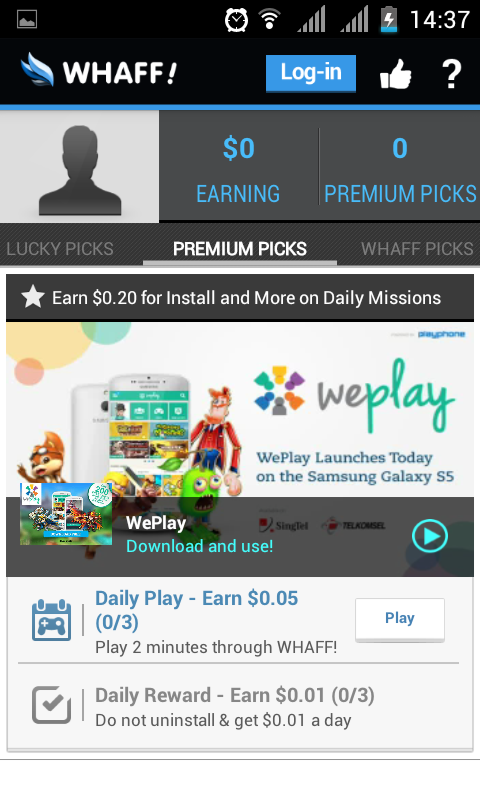
Premium picks.

Dipremium pick aka nada beberapa applikasi yang perlu anda download dan anda mainkan setiap harinya untuk mendapatkan uang dollars. Anda hanya perlu memainkan applikasinya sekitar 2-5 menit setiap harinya melalui Whaff.

Dan anda akan mendapatkan tambahan rewards jika anda tidak meng-uninstall applikasi tersebut selama yang ditawarkan.

Selain premium picks, silahkan download Applikasi yang ada di Whaff Picks untuk mendapatkan uang Dollars.

Invite To Share and Earn!

Silahkan invite to share and earn teman-teman anda untuk mendapatkan uang dollars, anda hanya dibatasi untuk invite sebanyak 50 orang setiap harinya. Jadi hal ini bisa anda lakukan setiap hari untuk mendapatkan rewards berupa uang dollars.

Other Pick

Disini anda bisa melakukan beberapa task untuk mendapatkan reward baik beruapa dollars atau poin yang akan diakumulasikan dalam bentuk dollar ke account anda. Task disini bermacam-macam ada yang hanya dengan melihat iklan saja, download dan menjalankan applikasi, mendaftar dan atau membeli barang.


Jika anda melakukannya setiap hari, anda akan mendapatkan uang sebesar 1 – 2$ setiap hari, maka sebulan bisa menghasilkan 30$ yang jika di rupiah kan sebesar 400ribu. Dan jika tasknya sudah tidak berlaku anda bisa uninstall aplikasi-aplikasi yang tadi anda download dan tidak anda perlukan.

Jika uang sudah terkumpul sebesar minimal 10$ anda bisa withdraw ke Paypal anda, selain dengan paypal anda bisa exchange atau menukarkan uang anda dengan Xbox Gift Card, Playstation Gift Cards, Amazon Gift Cards, Google Play Gift Cards, Steam Gift Cards dan Facebook Gift Cards.

Transaksi withdraw anda akan selesai dalam jangka waktu maksimal 3 hari kerja.

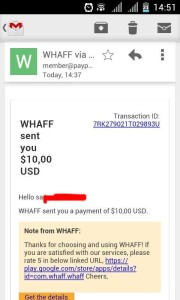
Jika anda mengambil 10$ uang anda dengan Paypal maka uang yang sampai ke Paypal anda akan terpotong sebesar 0.50$. setelah saya Tanya ke pihak Whaff dijelaskan bahwa potongan tersebut sebagi fee jual beli jasa yang dikenakan oleh Paypal. Saya menjual jasa mendownload dan menjalankan aplikasi di HP saya dan Whaff sebagi pihak yang membeli jasa tersebut. Ya seperti itulah penjelasan dari pihak Whaff.

pembayaran dari whaff

Itulah cara saya mendapatkan uang saya dengan menggunakan HP Android. Mudah dan simple bukan ?
Sebenarnya ada beberapa aplikasi mencari uang di android dan akan saya ulas dipost berikutnya.

Jika informasi ini bermanfaat bagi anda, Tolong untuk dishare keteman-teman atau rekan anda agar semua orang bisa mengetahui informasi ini.

Happy Earning.. !


Cek juga saldo paypal saya liat di posting sebelumnya.


Update TRICK


New code for 40$ from whaff code generator

Invitation code : AY69376
100%work

Caranya :
1. Download Whaff app. in google play store
2. Install and open the app,
3. Login with facebook account.
4. Type this invitation code: AY69376 for first $25 for each id
5. Exchange the point for paypal or google gift card

kode terbaru 40$ langsung dari WHAFF hack generator
Kode Undangan : AY69376
100%work

Caranya :
1. Download aplikasi Whaff di smartphone anda,cari di playstore
2. Instal, dan buka aplikasi tersebut,
3. Login dengan menggunakan akun facebook.
4. Masukan kode invitation berikut AY69376 untuk dapat $25
5. Download dan mainkan aplikasi yang tersedia untuk mendapatkan dolar secara gratis,
6. Tukarkan saldo tersebut dengan dengan Paypal atau google cash jika ingin dicairkan ke rupiah

by bagas pramudita (rank 1 whaff rewards)

Tuesday, October 6, 2015

Cara menambah dolar di paypal dengan cepat

Showbox adalah aplikasi terpercaya yang sangat mudah untuk mendapatkan dolar, tinggal buka aplikasinya setiap hari, atau download aplikasi yang ada atau bisa juga ikuti petunjuk tugas untuk mendapatkan dolar, atau anda juga bisa mengundang teman anda untuk mendapatkan dolar, teman anda dapat, anda juga dapat. Caranya....

Cara dapetin gem clash of clan

1. Download aplikasinya klik disini

2. Setelah selesai download buka aplikasinya

3. Sign up dengan facebook setelah selesai

4. Masukan kode " Z39vFC0 " tanpa tanda petik, maka kamu akan mendapatkan 100 point, atau sekitar Rp. 1400,00. Lumayan kan

5. Setelah poin terkumpul hingga 1000 atau 10000, tukarkan dengan paypal, untuk yang belum daftar paypal klik disini

6. Setelah itu masukan alamat paypal kamu.

7. Selamat anda telah berhasil mendapatkan saldo paypal secara gratis.